
Share Wedding Photos Instantly with QR Codes (No App Needed)
How Can Guests Easily Upload Wedding Photos by QR?
Weddings are filled with unforgettable moments — laughter, tears, spontaneous dances, and countless candid snapshots taken by your guests. But one question keeps coming up for couples:
How can guests easily upload wedding photos by QR?
The answer is simpler than you might think — and it’s transforming how modern weddings collect and share memories.
The Problem: Photos Are Everywhere — But Hard to Collect
After the wedding, guests go home with hundreds of photos on their phones. Some might send a few via WhatsApp, others forget entirely, and many photos are never shared at all.
The result? You miss out on some of the most authentic, emotional, and fun moments of your big day.
The Solution: QR Code Photo Upload
A QR code-based photo upload system allows your guests to instantly share their pictures — no apps, no logins, no hassle.
Here’s how it works:
- You create a private wedding photo gallery.
- You generate a unique QR code.
- Guests scan the QR code with their smartphone.
- They upload photos directly from their device.
That’s it. No technical skills required.
Why QR Code Uploads Work So Well
1. No App Download Required
Guests don’t want to install another app. A QR code opens directly in the browser — fast and frictionless.
2. Instant Access
Whether during the ceremony, at dinner, or on the dance floor — guests can upload photos in seconds.
3. Works for All Ages
From tech-savvy friends to older relatives — scanning a QR code is simple and familiar.
4. Centralized Memories
All photos are collected in one place, in full quality — ready to relive and download anytime.
Best Practices for Using QR Codes at Your Wedding
To get the most out of your QR photo upload system, follow these tips:
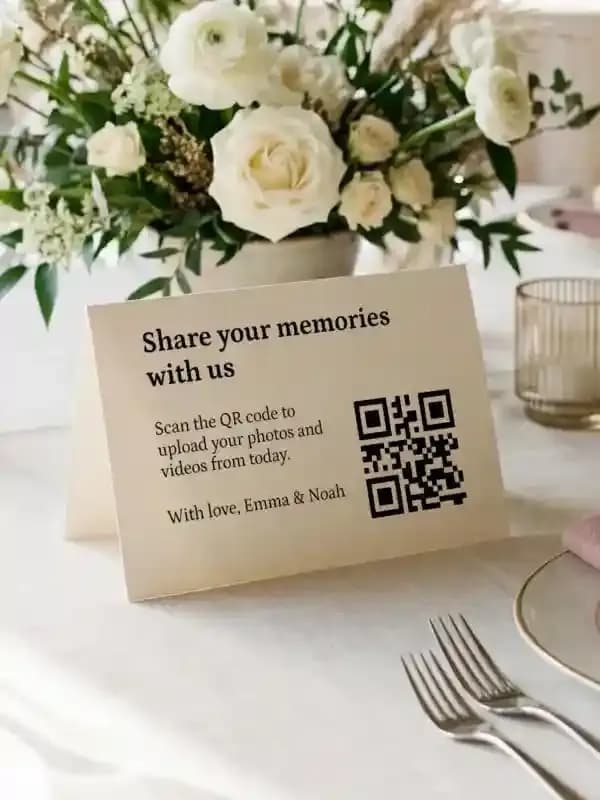
- Place QR codes on tables (e.g., table cards or menus)
- Add them to your wedding signs near the entrance
- Include a short instruction like: “Scan here to share your photos with us!”
- Remind guests during speeches to upload their pictures
The more visible your QR code, the more photos you’ll receive.
Why Snapveil Is the Easiest Solution
With Snapveil, collecting wedding photos becomes effortless.
Snapveil is designed specifically for events like weddings and offers:
- QR code access without app installation
- Mobile-first upload experience
- Original-quality photo storage
- Simple gallery sharing for all guests
- Fast setup in minutes
Instead of chasing guests for photos, you create one central place where everything comes together automatically.
Real Wedding Scenario
Imagine this:
Your guests sit at beautifully decorated tables. On each table, a small card displays your QR code.
During dinner, someone takes a candid photo — they scan the code, upload it instantly, and within seconds, it’s part of your wedding gallery.
By the end of the night, you already have hundreds of real, unfiltered moments — captured from every perspective.
Final Thoughts
If you’re wondering how guests can easily upload wedding photos by QR, the answer is clear:
Make it effortless, instant, and accessible — and your guests will gladly share their memories.
A simple QR code can turn scattered photos into a complete story of your wedding day.
Start collecting your wedding memories the smart way — with a QR code that everyone can use.
Related Articles

DIY Wedding Place Cards: Format, Paper and Printing at Home
How to make wedding place cards yourself: which format and paper work, what belongs on the card, and how a guest list becomes a print-ready PDF.
Read article
Wedding Table Numbers: Size, Placement and a Free Printable Template
How large wedding table numbers need to be, where they stand and what else goes on the card. With a free template to print at home in A6 or A5.
Read article
Wedding Welcome Sign: Wording, Size and Printing
What belongs on a wedding welcome sign, which size works at the entrance and how to print it. With wording ideas and a free template in A4 and A3.
Read article