
SD vs HD vs Original: Choosing Your Export Quality for Event Photos
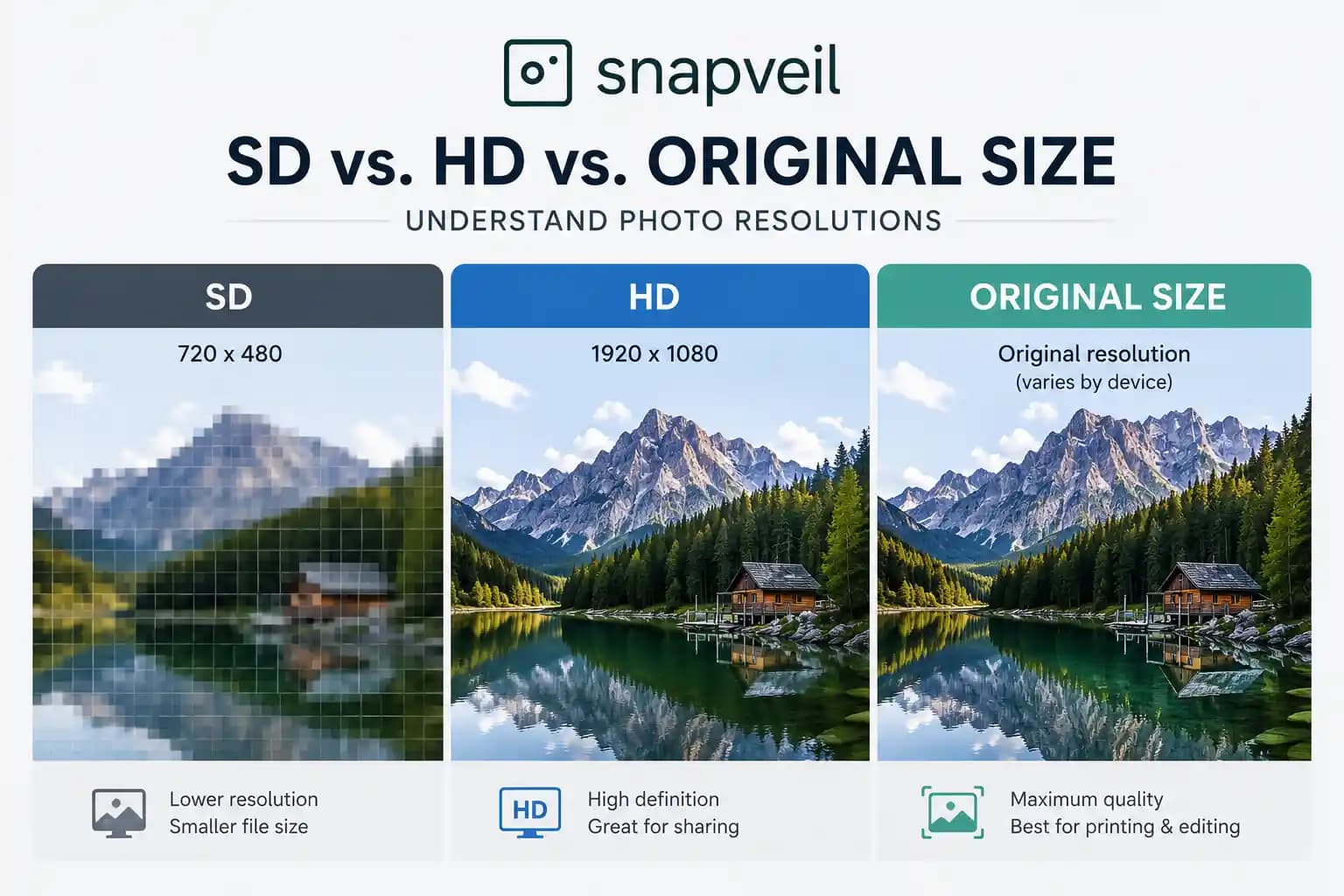
Every wedding photographer has heard some version of this story: a guest photo turns out to be the emotional centerpiece of the day — grandma laughing mid-toast, the ring exchange caught from an angle the official photographer missed — and then it turns out the file is 800 pixels wide, stripped of every detail, and useless for anything beyond a phone screen.
Export quality isn't a technical footnote. It's the difference between a photo you can print, edit, and archive — and one you can only scroll past.
If you're choosing a gallery platform, or trying to explain to a couple why their guest photos matter, understanding the real differences between SD, HD, and Original exports will save you a lot of frustration later.
Why Export Quality Is Not One-Size-Fits-All
Not every photo needs to be a 45-megabyte RAW-adjacent file. A guest sharing a quick shot to a group chat doesn't need the same file as a photographer building a wedding album for print. The smartest gallery platforms let you choose the right quality tier for the right job — instead of forcing everyone into the same compressed default.
Here's how the three tiers typically break down.
SD, HD, and Original: A Side-by-Side Comparison
| SD (Standard) | HD (High Definition) | Original | |
|---|---|---|---|
| Typical resolution | Around 400–1,080 px wide | Around 1,600–2,048 px wide | Full sensor resolution (as captured) |
| File size | Small (a few hundred KB) | Medium (1–5 MB) | Large (5–50+ MB depending on camera) |
| Metadata retained | Often stripped | Partially retained | Fully retained (EXIF, timestamps, camera settings) |
| Best for | Social sharing, quick previews, messaging apps | Digital albums, screen displays, casual prints up to A4 | Professional printing, retouching, archival, legal/insurance records |
| Ideal user | Guests sharing casually | Couples building a digital keepsake | Photographers, professional editors, official event organizers |
The pattern is simple: as the stakes go up — print size, editing depth, long-term storage — the need for full resolution and intact metadata goes up with it.
Why Metadata Matters as Much as Resolution
Resolution gets all the attention, but metadata is often the more costly thing to lose.
When a photo is exported with its metadata intact, it carries:
EXIF data — camera model, lens, aperture, shutter speed, ISO. Essential for photographers reviewing technical quality or replicating a look. Timestamps — the exact capture time, which matters enormously when sorting hundreds or thousands of guest photos into a coherent timeline of the day. Color profile information — needed for accurate color reproduction when a photo goes to print. Copyright and attribution tags — increasingly important for platforms and photographers who want to credit contributors properly.
Strip the metadata, and you strip the ability to sort, verify, or professionally reproduce the image. A folder of 2,000 guest photos with no timestamps is a sorting nightmare. The same folder with metadata intact can be organized chronologically in seconds — which matters a great deal once you're trying to export photos with metadata into an editing workflow rather than just look at them.
Real Scenarios: Which Tier Do You Actually Need?
You're a wedding photographer building the final album. You need Original. Nothing less will hold up to print-size cropping, color grading, or client scrutiny. And you need the metadata intact so you can sort guest contributions alongside your own captures by actual capture time, not upload order.
You're an event organizer archiving photos for legal or insurance purposes. Original, every time. A compressed, metadata-stripped photo has less evidentiary value — you want captured-at timestamps and unaltered files.
You're a couple who just wants a digital keepsake to scroll through and share. HD is usually the sweet spot — full-looking images without unnecessarily large files clogging up a phone.
A guest wants to post a candid shot to their Instagram Story. SD is fine. Nobody needs a 40MB file for a nine-second story.
The mistake many platforms make is assuming everyone needs the same tier — either overcompressing everything (frustrating photographers) or exporting everything at full size by default (frustrating guests who just want a quick, shareable file).
Common Mistakes That Cost Photographers Later
Exporting SD by accident and losing print rights value. If a client wants a large-format print six months later and all you have is an 800px file, there's no fixing that after the fact. Assuming metadata survives every export. Many consumer-grade sharing tools strip EXIF data automatically for privacy or file-size reasons — which is great for guests, but a real problem if you needed that data for sorting or verification. Not checking export settings before the event. The best time to confirm your gallery's export tier defaults is before doors open, not after 300 guests have already uploaded photos.
How Snapveil Handles Export Quality
Snapveil was built around the idea that photographers and organizers shouldn't have to choose between guest convenience and professional-grade output. That's why galleries support tiered exports — SD (up to 430 px), HD (up to 1,600 px) and Original — so each person downloading photos gets the right file for their purpose. On the free trial, photos are downloaded one at a time in SD with a slim Snapveil frame; Starter, Pro and Ultra unlock HD and the untouched originals without a frame. New photos on Pro and Ultra are also stored in up to 4K, so they stay sharp on a laptop or TV and when you zoom in.
For photographers and organizers specifically, Snapveil preserves full metadata on Original exports (Pro and Ultra), and supports mass download of an entire event gallery as a single organized archive — no manual, one-by-one saving required. Because Snapveil is entirely web-based, there's no app for guests to install — they simply scan a QR code, and the platform is built with GDPR compliance in mind from the ground up, which matters increasingly for professional photographers working with EU clients.
Whether you're pulling a full gallery into Lightroom for post-processing or just want to confirm that timestamps and camera data survived the export, the goal is the same: no surprises when you open the files.
The Bottom Line
Export quality isn't just a technical setting — it's a decision about who your photos are for and what they'll be used for next. SD works for quick, casual sharing. HD covers most everyday digital use. Original, with full metadata intact, is non-negotiable for anyone doing professional work, printing, or archiving.
Choosing a gallery platform that lets you set the right tier — rather than forcing a single compressed default on everyone — is what separates a smooth post-event workflow from a frustrating one.
Ready to see the export options in action? Create a free gallery, upload a few photos and look at the SD download; Starter and Pro add HD and the original files with their metadata intact. No app required.
Related Articles
Wedding Guest Book Ideas: 30 Creative Alternatives Your Guests Will Use
30 wedding guest book ideas: classic books with a twist, keepsakes to hang, interactive stations, digital options and prompts for your guests.
Read article
Wedding Photo Scavenger Hunt: 50 Photo Challenge Ideas for Your Guests
50 wedding photo scavenger hunt ideas, sorted by the flow of the day, plus how to run the game so every guest photo ends up with you.
Read article
Disposable Cameras at Weddings: Cost, Tips and the Digital Alternative
What disposable cameras really deliver at a wedding, what they cost, how to get better shots and how to combine film scans with a QR gallery.
Read article